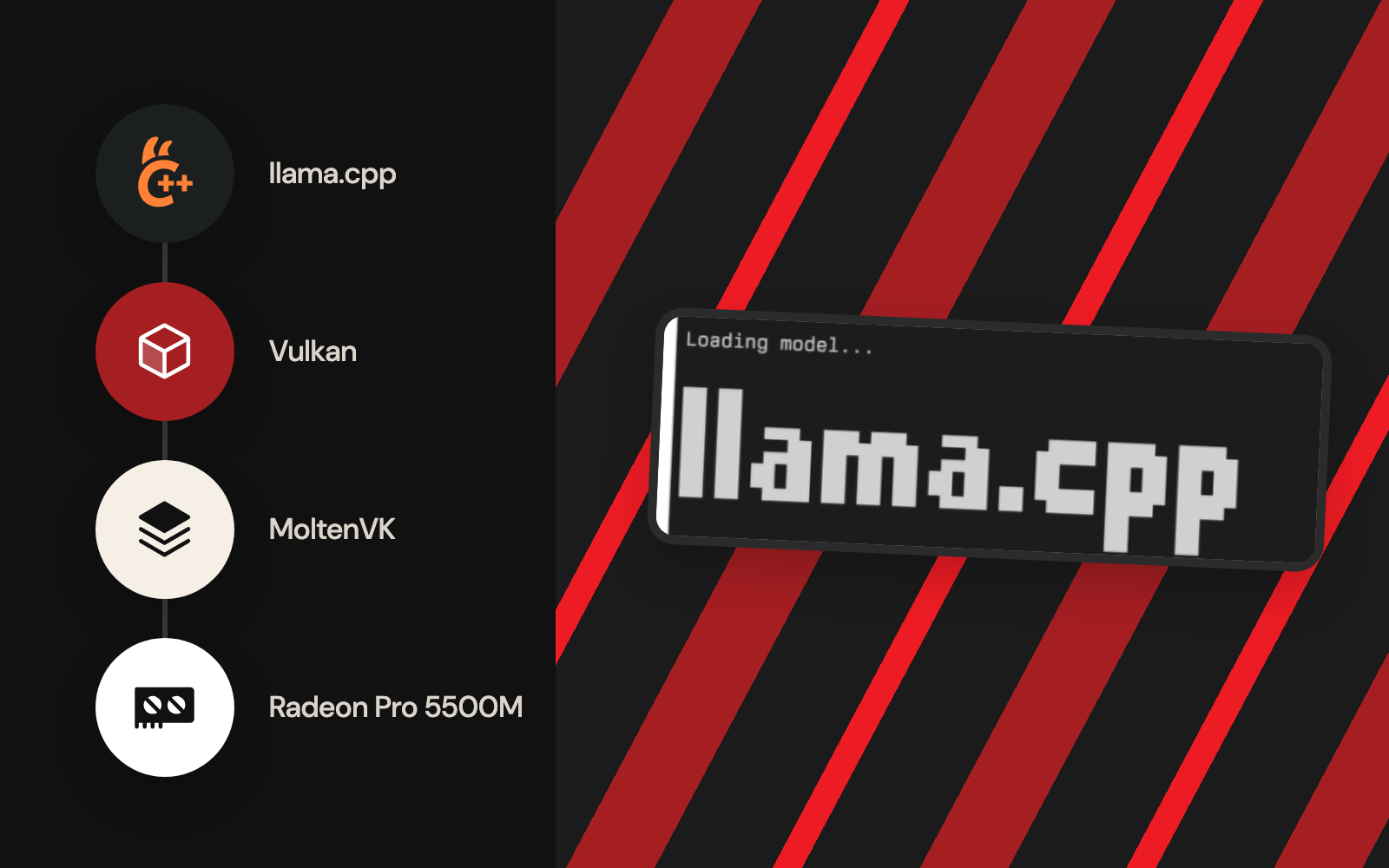
From the CPU to the Radeon
The previous episodes established that the machine could run local language models, connect them to developer tools and recover interrupted multi-gigabyte downloads. Performance was still the obstacle. In the original Ollama setup, ollama ps showed Qwen3.5 4B at 100% CPU, and a stalled inference worker once used about 778.6% CPU in macOS process accounting. That figure means roughly 7.8 logical cores' worth of CPU time; GPU use is a separate measurement.
The hardware had an AMD Radeon Pro 5500M with 8 GB of dedicated graphics memory. So the inference engine changed and the Mac stayed. A custom llama.cpp Vulkan build, running through MoltenVK on macOS, detected the Radeon as Vulkan0 and loaded quantised Qwen models onto the GPU. Episode 5 has the full throughput comparison; this episode shows how acceleration became possible and how the active backend was proven.
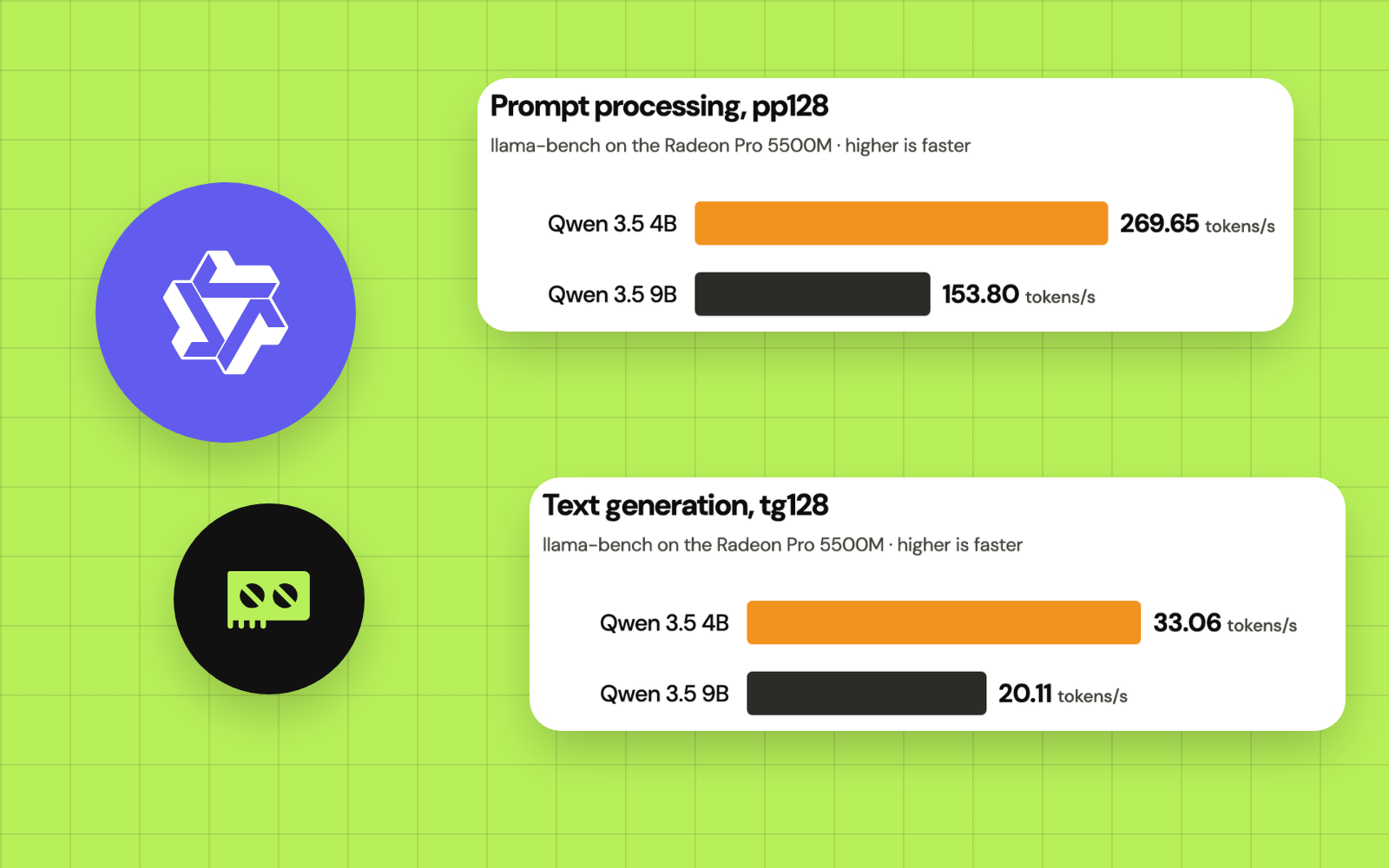
The numbers that came out of it: 33 of 33 eligible layers of Qwen 9B on the GPU, and llama-bench measuring 33.06 generated tokens per second for the 4B model against 20.11 for the 9B. They hold for this Mac, its drivers and this llama.cpp build; on other hardware, measure your own.
Architecture: Why Vulkan works on this Mac
On macOS, Vulkan applications run through a portability implementation in place of a native Vulkan driver. MoltenVK translates Vulkan calls to Apple's Metal API. The inference path:
- 1
Qwen GGUF weights
- 2
llama.cpp / ggml Vulkan backend
- 3
Vulkan loader + MoltenVK driver (ICD)
- 4
Apple Metal runtime
- 5
AMD Radeon Pro 5500M (8 GB VRAM)
Every macOS application makes its own choice about the discrete AMD GPU. The Ollama version used here ran on the CPU, and changing the model or the context length left it there. The backend and its device selection were the decisive changes. MoltenVK has portability limits, so a GPU that enumerates may still hit errors with some models or Vulkan features. See LunarG's macOS Vulkan SDK guide and the llama.cpp build instructions.
Tested environment and prerequisites
| Component | Configuration |
|---|---|
| Computer | 2019 16-inch MacBook Pro; 2.3 GHz eight-core Intel Core i9 |
| Memory | 32 GB RAM |
| Graphics | AMD Radeon Pro 5500M, 8 GB; Intel UHD Graphics 630 also present |
| OS | macOS Tahoe 26 |
| Model files | Existing Ollama-downloaded Qwen3.5 GGUF blobs, reused as they are |
| Vulkan SDK | LunarG 1.4.363.0, installed under ~/VulkanSDK/1.4.363.0 |
| Vulkan translation layer | MoltenVK, supplied with the macOS SDK |
| Build tool | CMake GUI 4.5.0-rc1, executable under /Applications/CMake.app/Contents/bin/cmake |
| Compiler | AppleClang from the installed Xcode developer tools |
| Source runtime | Official ggml-org/llama.cpp, built with Vulkan enabled and Metal disabled |
| Resulting device | Vulkan0: AMD Radeon Pro 5500M |
- VulkanSDK 1.4.363.0 with MoltenVK
- CMake4.5.0-rc1
- llama.cppVulkan build
- Qwen3.5 4B and 9B
- Ollamamodel files
These are the versions tested; newer releases will follow. The build log records Vulkan 1.4.363, glslc and glslangValidator, AppleClang, the Vulkan backend and the final llama-cli and llama-bench targets.
You will need the normal macOS developer tools, adequate free disk space for the SDK and build, and a local GGUF model compatible with llama.cpp. Familiarity with Terminal helps, but the commands below are provided in order. Keep production project files separate from experiments.
1. Verify the baseline before changing anything
Check the operating system, CPU architecture, available graphics hardware, and existing Ollama state:
sw_vers
uname -m
system_profiler SPHardwareDataType SPDisplaysDataType
ollama ps
Expected on the test machine: uname -m reports x86_64; System Information lists the Radeon Pro 5500M and Intel UHD 630; the earlier ollama ps output showed the 4B model with PROCESSOR 100% CPU. A CPU-only Ollama session describes that one runtime; another runtime may still use the GPU.
The ollama ps output from the original Ollama trial:
NAME          ID              SIZE      PROCESSOR    CONTEXT    RUNNER      UNTIL
qwen3.5:4b    d8b0f5e9760c    4.2 GB    100% CPU     32768      llamacpp    Stopping...
Confirm the macOS build tools before installing the GPU SDK:
xcode-select -p
clang --version
git --version
If the first command fails because the command-line tools are missing, run xcode-select --install and complete Apple's installer. Tools that are already configured stay as they are. This step installs build tools; the GPU backend comes next.
2. Install the LunarG Vulkan SDK for macOS
Download the macOS Vulkan SDK from the official LunarG Vulkan SDK portal. In the experiment, the installed release was 1.4.363.0. Run the macOS installer and include the core SDK and MoltenVK components. The exact installer screens and package names may change.
Verify the installation directory before copying any environment commands:
ls "$HOME/VulkanSDK"
ls "$HOME/VulkanSDK/1.4.363.0/setup-env.sh"
Replace 1.4.363.0 with the version actually installed if it differs. For the tested version, activate the SDK in each Terminal session where you plan to configure, build or run the Vulkan binary:
source "$HOME/VulkanSDK/1.4.363.0/setup-env.sh"
export VK_DRIVER_FILES="$VULKAN_SDK/share/vulkan/icd.d/MoltenVK_icd.json"
Confirm the essential paths:
printf 'VULKAN_SDK=%s\n' "$VULKAN_SDK"
ls "$VK_DRIVER_FILES"
command -v glslc
command -v glslangValidator
command -v vulkaninfo
Expected: a populated SDK path, an existing MoltenVK_icd.json, and working shader and Vulkan tools. The VK_DRIVER_FILES setting explicitly selects MoltenVK's Vulkan driver manifest, which helps because recent macOS SDKs can ship more than one driver. Set it per Terminal session, so other GPU projects keep their own Vulkan configuration. See the current LunarG macOS setup guide.
Check GPU enumeration:
vulkaninfo --summaryLook for an AMD Radeon device. Some SDK and loader combinations print validation or duplicate-layer warnings; a warning and a failed device enumeration are different things. The first diagnostic sessions here produced noisy layer messages, so the Vulkan Configurator turned global validation layers off during testing, with the explicit MoltenVK driver setting kept. If vulkaninfo lists zero physical devices, fix the SDK or driver before compiling llama.cpp.
3. Install CMake and obtain the official llama.cpp source
Use CMake's official download page to install a current macOS CMake application. On this Intel Tahoe system, acquiring a Homebrew bottle for CMake was problematic, so the verified workflow used the GUI installer. Its executable was:
/Applications/CMake.app/Contents/bin/cmake --versionVersion on the test Mac: cmake version 4.5.0-rc1. This path belongs to the GUI installer; if CMake is already on your PATH, cmake --version works equally well. Use a version that meets the source tree's stated minimum.
For a fresh reproducible project directory, clone the official repository:
mkdir -p "$HOME/Documents/app/llm"
cd "$HOME/Documents/app/llm"
git clone https://github.com/ggml-org/llama.cpp.git
cd llama.cpp
git rev-parse --short HEAD
The actual experiment first compiled under Downloads, then moved and rebuilt the source under ~/Documents/app/llm/llama.cpp. The permanent workspace migration and clean-build rationale are documented in Episode 6. For new installations, starting in the permanent directory avoids that extra move. Recording the Git commit is important because the llama.cpp build system, defaults and supported models evolve rapidly.
4. Configure a clean Vulkan build
Use a new build directory, so CMake starts clean, free of CPU-only settings or stale absolute paths from another checkout:
cd "$HOME/Documents/app/llm/llama.cpp"
source "$HOME/VulkanSDK/1.4.363.0/setup-env.sh"
export VK_DRIVER_FILES="$VULKAN_SDK/share/vulkan/icd.d/MoltenVK_icd.json"
/Applications/CMake.app/Contents/bin/cmake \
  -S . -B build-vulkan-new \
  -DGGML_VULKAN=ON \
  -DGGML_METAL=OFF \
  -DGGML_BLAS=ON \
  -DCMAKE_BUILD_TYPE=Release
This configuration reproduces the backend choices of the working build, whose log confirms Vulkan and BLAS included and Metal disabled. Accelerate-backed BLAS adds a CPU-side backend; the offload to the Radeon comes from Vulkan.
Two configuration options are essential for this demonstration:
| Option | Purpose |
|---|---|
| -DGGML_VULKAN=ON | Compile the ggml Vulkan accelerator backend |
| -DGGML_METAL=OFF | Disable the separate native Metal backend for an unambiguous Vulkan test |
Other options control optimisation or additional backends. The official llama.cpp build guide is the reference if flags change in later revisions.
Lines to expect in the configure output:
-- Found Vulkan: .../libvulkan.dylib (found version "1.4.363")
-- Vulkan found
-- Including Vulkan backend
-- BLAS found ... Accelerate.framework
-- Generating done
The ... above stands for a machine-specific folder path. The same log also lists glslc and glslangValidator as available.
5. Compile the command-line tools
Run the build with a modest parallelism setting suitable for the tested Intel Mac:
/Applications/CMake.app/Contents/bin/cmake \
  --build build-vulkan-new \
  --config Release \
  --target llama-cli llama-bench llama-server \
  -j 4
The initial observed build explicitly targeted llama-cli and llama-bench; llama-server was also built and used later in the project. Including it here prepares the reader for the OpenCode integration in Episode 7. Building can take time because shader-generation and ggml Vulkan components need compilation.
Verify the files were created:
ls -lh build-vulkan-new/bin/llama-cli
ls -lh build-vulkan-new/bin/llama-bench
ls -lh build-vulkan-new/bin/llama-server
The build ends with:
[100%] Built target llama-cli
[100%] Built target llama-bench
The full build log also holds hundreds of Vulkan compute-shader compilation lines. An unrelated warning about an optional UI asset download appeared, and the two requested command-line targets still finished successfully. Judge success by the final target status and the executable on disk, whatever scrolls past in the middle of a long build.
6. Confirm that llama.cpp sees the Radeon
Now verify the compiled binary itself, beyond the Vulkan SDK:
./build-vulkan-new/bin/llama-cli --list-devicesThe important result is a device named AMD Radeon Pro 5500M with an identifier such as Vulkan0. The machine also has an Intel integrated GPU, so check the name beside each identifier: the first device a tool shows may be the wrong compute target. Device numbers can differ across systems and builds.
If the Radeon is available, select it explicitly when running a model. For clarity, the following uses the exact Ollama 4B model blob installed on the test Mac. Its hexadecimal filename belongs to that one downloaded file; yours will differ:
MODEL_GGUF="$HOME/.ollama/models/blobs/sha256-a9d0a3e1d8c91732a3812becd31f8d4a8ff57414903f226306069f0437e2ac50"
ls -lh "$MODEL_GGUF"
./build-vulkan-new/bin/llama-cli \
  -m "$MODEL_GGUF" \
  --device Vulkan0 \
  -ngl 99 \
  -c 2048 \
  -n 96 \
  --flash-attn off \
  -st \
  -p 'Write a small JavaScript function that adds two numbers.'
-st (single turn) makes the newer llama-cli answer once and exit; leave it out for an interactive chat. For a different installation, point MODEL_GGUF at a GGUF file that llama.cpp can load, whether it carries a .gguf name or sits in Ollama's blob store. Use the language-model file itself: a model manifest, a multimodal projector or another file from ~/.ollama/models will fail. Ollama's blobs filenames are hashes, so read and reuse them and leave their names and contents as they are. The command keeps flash attention off; Episode 10 measures where turning it on pays.
What successful verification means: the model loads, the log names the Radeon Vulkan device and reports GPU layer assignment, and the generated response makes sense. -ngl 99 requests offloading of supported layers, and the log shows whether that happened. In the later 9B diagnostic run, the result was 33 of 33 layers offloaded to the Radeon, with about 4,812.25 MiB GPU model buffer and 545.62 MiB CPU-mapped buffer: most of the model on the GPU, with a smaller share mapped in system memory.
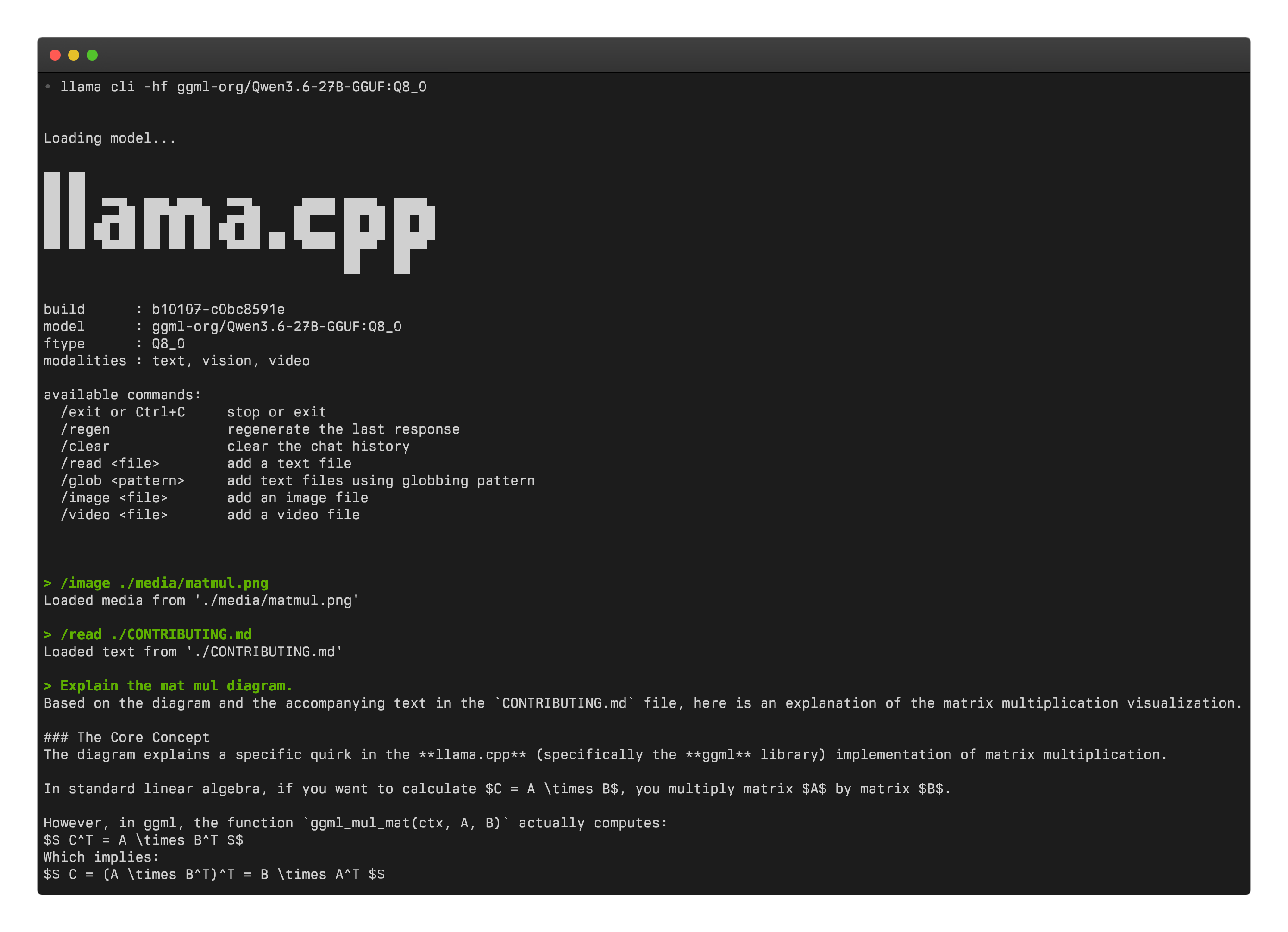
Qwen runs in the new engine straight from the existing download. Reusing the model blob mattered on this unreliable internet connection.
Troubleshooting: the failures that mattered
| Symptom | Diagnosis | Practical next action |
|---|---|---|
| cmake: command not found | CMake missing, or its CLI missing from PATH | Run /Applications/CMake.app/Contents/bin/cmake --version; install CMake if it is missing |
| Could NOT find Vulkan | SDK environment unset in this shell, or an incomplete SDK | Re-run source .../setup-env.sh; check VULKAN_SDK, glslc, glslangValidator and the ICD file |
| Vulkan lists zero AMD GPUs | MoltenVK driver missing or unselected, or an enumeration problem | Set VK_DRIVER_FILES explicitly; check vulkaninfo --summary before rebuilding |
| Duplicate Vulkan layer or validation warnings | SDK configuration may activate extra global layers | Review the Vulkan Configurator; turn off extra global validation for baseline tests and leave GPU drivers alone |
| Build still references an old Downloads path | CMake cached absolute source and build locations | Create a fresh build directory in the new source location and start from an empty build cache |
| Compiling from source takes a long time | Numerous ggml and shader targets | Keep the build running; use limited parallel jobs; verify the final targets |
| llama-cli --list-devices shows the CPU and zero Vulkan GPUs | Binary compiled with the Vulkan backend off, or the runtime driver fails to load | Check cached CMake flags and dynamic libraries; confirm Vulkan tools work in the same Terminal |
| -ngl 99 specified, little offload | Too little free VRAM, model incompatibility or the wrong device | Inspect the real load logs, reduce context or other allocations, try a smaller quantisation |
| GPU loads, then output is corrupted or the program crashes | Backend, model or driver feature compatibility | Test a known small GGUF, pin the source version, check llama.cpp issues; treat each Vulkan build's stability as something to test |
“Validation OFF” was a local diagnostic change to quiet duplicate-layer noise. Vulkan validation earns its keep when debugging real API misuse, so restore it when that matters. Likewise, keep macOS security protections on; a model should run with them in place.
What this success proves, and what stays open
The important improvement was architectural: a Mac whose first local-AI runtime used the CPU could run an alternate inference engine on its dedicated AMD GPU. The Radeon was detected, the model loaded, and GPU layers were verifiably assigned. The workload still used CPU-side services and memory where appropriate.
Open questions remain: whether GPU acceleration improves answers, whether a large context fits in 8 GB of VRAM, whether every llama.cpp revision behaves the same, and whether OpenCode and image input work straight away. Each needs its own test, as does the Radeon's speed against a CPU on other workloads.
The next episode makes the performance case with reproducible measurements: Qwen3.5 4B versus 9B, prompt processing versus generation, offloading evidence, and the limits of comparing Ollama CPU chat to a standardised GPU benchmark.
Next: Episode 5: AMD Radeon Pro 5500M LLM Benchmarks, Qwen 4B vs 9B.
References
Primary documentation:
- LunarG: Vulkan SDK for macOS, Getting Started: environment setup, driver manifest selection and MoltenVK.
- LunarG: Vulkan SDK download: official SDK releases.
- ggml-org/llama.cpp: build guide: Vulkan and Metal CMake options and source builds.
- ggml-org/llama.cpp: GitHub repository: source and issues for backend compatibility.
- CMake: downloads and CMake command-line documentation: configure and build behaviour.
- MoltenVK upstream repository: portability layer implementation and its limits.
- Published
- Author
- Booban Net.
- Category
- AI & Automation