From working to repeatable
A local language model can be working perfectly in one Terminal session and become impossible to reproduce a week later. A build directory may contain absolute references to its original source folder. An inference command may depend on environment variables set only in one shell. And a 6 GB model may already exist on disk even though a new tool appears to be asking for another download.
That was the situation after the GPU experiments in Episodes 4 and 5. The Intel MacBook Pro could run Qwen3.5 4B and 9B on its Radeon Pro 5500M, while the source tree and first build still lived in a temporary Downloads workspace. This time the objective was a persistent, repeatable, sturdier setup, with the benchmark left as it was.
Outcome: The llama.cpp source was copied to ~/Documents/app/llm/llama.cpp; a new Vulkan build was compiled and verified there; a qwen-gpu.sh launcher was pointed at those binaries; and both model selections launched successfully. The old Downloads workspace stayed on disk. A shared context setting and one-word model commands came next, in the command layer below; image input waited for Episode 10.
What the permanent workspace contains
| Component | Tested location or role | Status at the end of this episode |
|---|---|---|
| Workspace root | ~/Documents/app/llm/ | Created and used |
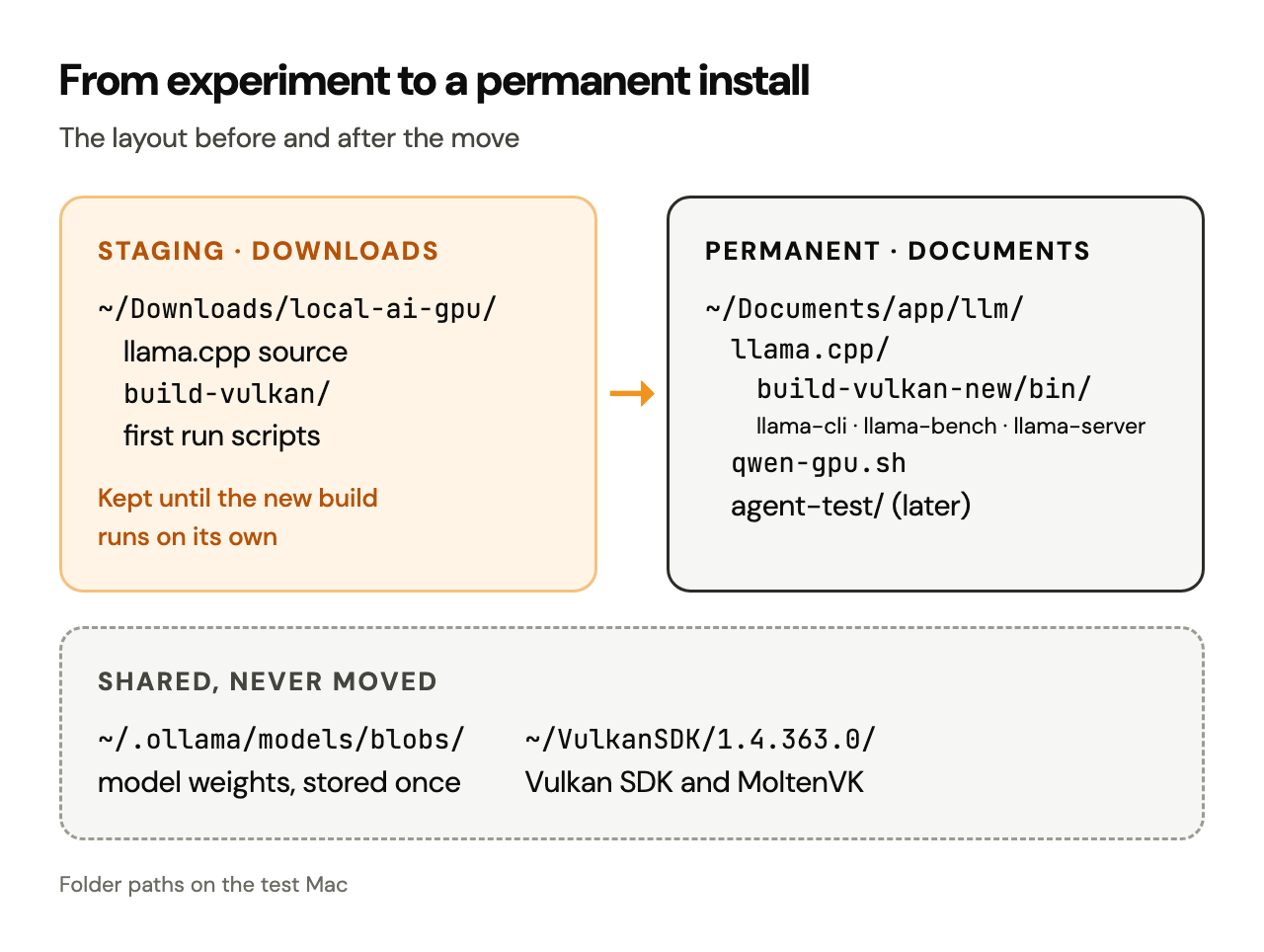
| llama.cpp source | ~/Documents/app/llm/llama.cpp/ | Copied from Downloads |
| Fresh compiled executables | llama.cpp/build-vulkan-new/bin/ | Built and executed |
| Vulkan SDK | ~/VulkanSDK/1.4.363.0/ | Kept in its original SDK location |
| Qwen model data | ~/.ollama/models/blobs/ | Reused in place |
| Terminal launcher | ~/Documents/app/llm/qwen-gpu.sh | Executable; 4B and 9B tested |
| Coding-agent sandbox | ~/Documents/app/llm/agent-test/ | Used later with OpenCode |
| Original Downloads workspace | ~/Downloads/local-ai-gpu/ | Still present, kept on purpose |
Test machine: 2019 16-inch Intel MacBook Pro; eight-core Intel Core i9, 32 GB RAM, AMD Radeon Pro 5500M with 8 GB dedicated VRAM; macOS Tahoe 26. The inference backend used LunarG Vulkan SDK 1.4.363.0, MoltenVK and llama.cpp with Vulkan enabled and Metal disabled. Paths below describe the tested Mac; yours may differ.
- llama.cpprebuilt in place
- VulkanSDK 1.4.363.0
- CMake4.5.0-rc1
- Ollamamodel store
- Qwen3.5 4B and 9B
1. Inventory the working installation before moving anything
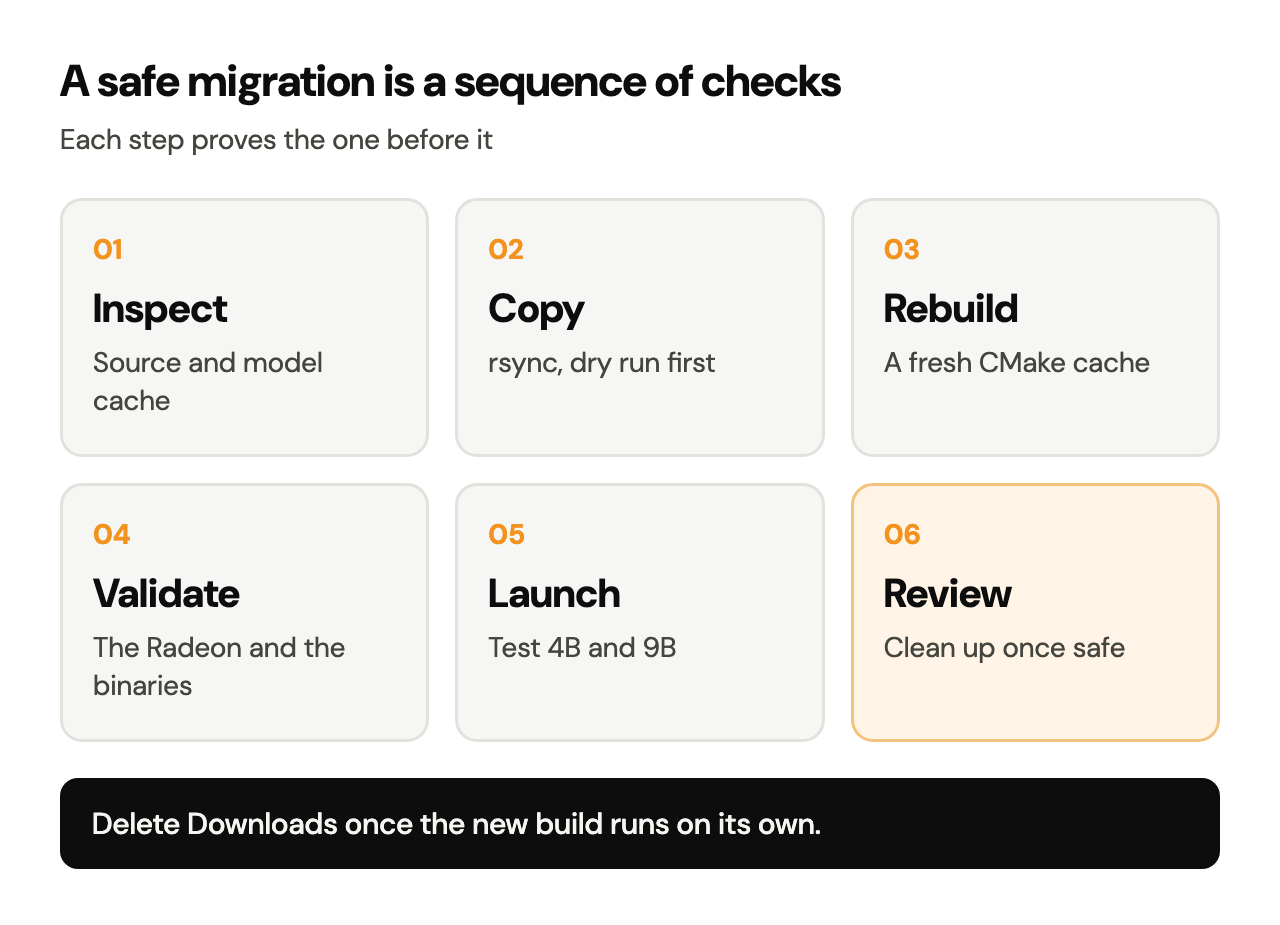
An important maintenance rule is to verify before copying and copy before deleting. First, find the working source and launcher; folder names on your Mac may differ from these.
ls -ld "$HOME/Downloads/local-ai-gpu" "$HOME/Documents/app/llm" 2>/dev/null
ls -lh "$HOME/Documents/app/llm/llama.cpp/build-vulkan-new/bin/" 2>/dev/null
ls -lh "$HOME/Documents/app/llm/qwen-gpu.sh" 2>/dev/null
On a machine already migrated, these checks show the persistent tree and existing executables. On an earlier-stage machine, the destination or files may be missing; treat a missing path as a reason to look closer before writing anything.
To check where the source came from, inspect the old directory in Finder or list its contents:
ls -la "$HOME/Downloads/local-ai-gpu"Here, the first llama.cpp checkout lived under the Downloads staging workspace. Inspect its internal layout before the next command; the example below assumes ~/Downloads/local-ai-gpu/llama.cpp/ is the source checkout.
2. Copy the source into a permanent location
If you start from an existing Downloads checkout, create the destination parent, then use rsync to copy the contents of the source folder. Run this on a new destination, or one whose contents are backed up and checked. On the test Mac the move is already done.
mkdir -p "$HOME/Documents/app/llm/llama.cpp"
rsync -avn \
  "$HOME/Downloads/local-ai-gpu/llama.cpp/" \
  "$HOME/Documents/app/llm/llama.cpp/"
The first command creates the folder. The -n in rsync -avn means dry run: it previews the copy and leaves every file as it is. Review the output. If the source tree and proposed destination are correct, perform the copy:
rsync -av \
  "$HOME/Downloads/local-ai-gpu/llama.cpp/" \
  "$HOME/Documents/app/llm/llama.cpp/"
The trailing slashes are deliberate: they copy the contents of llama.cpp/ and avoid a second nested llama.cpp directory. Apple's bundled rsync can differ from current GNU rsync, so these commands use widely supported options. This operation copies the source: the original and your Ollama model files stay where they are.
Verify the checkout before compiling
cd "$HOME/Documents/app/llm/llama.cpp"
git rev-parse --short HEAD
git status --short
ls CMakeLists.txt
Expected: a Git commit identifier, the root CMakeLists.txt, and a clean list of tracked source files. The commit identifier varies. Keep it with your build notes: it makes later troubleshooting far easier than “the latest llama.cpp.”
3. Why the old build directory needed a fresh rebuild
CMake remembers absolute paths in its generated cache and build files. Copying a built tree from Downloads to Documents may leave references to the old checkout, compiler outputs or SDK locations. Even if llama-cli happens to start, subsequent rebuilds may fail or compile against unintended paths.
This is why the migration used a fresh build directory named build-vulkan-new instead of trusting the copied build-vulkan folder. A fresh configure is the reliable fix for a moved CMake cache; search-and-replace edits and a successful compilation elsewhere both leave this build unproven.
Activate the Vulkan SDK in the new Terminal session
cd "$HOME/Documents/app/llm/llama.cpp"
source "$HOME/VulkanSDK/1.4.363.0/setup-env.sh"
export VK_DRIVER_FILES="$VULKAN_SDK/share/vulkan/icd.d/MoltenVK_icd.json"
vulkaninfo --summary
Expected: Vulkan tools are available and the AMD Radeon appears among the physical devices. The VK_DRIVER_FILES export was necessary here to point at the intended MoltenVK ICD. vulkaninfo may print duplicate-layer warnings while the GPU enumeration itself succeeds. If the Radeon is missing from the list, resolve that driver issue before rebuilding.
Configure from the permanent source folder
/Applications/CMake.app/Contents/bin/cmake \
  -S . -B build-vulkan-new \
  -DGGML_VULKAN=ON \
  -DGGML_METAL=OFF \
  -DGGML_BLAS=ON \
  -DCMAKE_BUILD_TYPE=Release
This command reproduces the tested backend choices. The test Mac used the executable inside /Applications/CMake.app, CMake 4.5.0-rc1; your own CMake may live elsewhere or carry another version. Confirm compatibility with the official build guide.
On a Mac that already has a verified build-vulkan-new, rerun the configure step for a deliberate rebuild or check alone. The following commands recreate the working state on a new checkout.
Build the three tools
/Applications/CMake.app/Contents/bin/cmake \
  --build build-vulkan-new \
  --config Release \
  --target llama-cli llama-bench llama-server \
  -j 4
The permanent build contained all three executables. llama-cli provides direct Terminal interaction, llama-bench provides performance measurements, and llama-server exposes a local API for software such as coding agents.
ls -lh build-vulkan-new/bin/llama-cli \
  build-vulkan-new/bin/llama-bench \
  build-vulkan-new/bin/llama-server
./build-vulkan-new/bin/llama-cli --list-devices
Expected: all three files exist, and the device listing includes AMD Radeon Pro 5500M as Vulkan0 on the test setup. The name and index may vary on other computers. This is a runtime validation, stronger than a successful CMake message.
4. Reuse the Qwen weights already downloaded by Ollama
A significant benefit of this arrangement is that model storage and model execution are separate choices. The Mac already had the Ollama installations of Qwen3.5 4B and 9B, and llama.cpp loads their actual GGUF model blobs directly, so the same weights are downloaded once.
The filenames on the test machine:
MODEL_4B="$HOME/.ollama/models/blobs/sha256-a9d0a3e1d8c91732a3812becd31f8d4a8ff57414903f226306069f0437e2ac50"
MODEL_9B="$HOME/.ollama/models/blobs/sha256-02d45dc1cf451ba2475ac33b301c2dd8f985abe4c182ce04a1f2f5bf0260278d"
ls -lh "$MODEL_4B" "$MODEL_9B"
Expected on the test Mac: about 2.46 GiB for the 4B text-model blob and 5.23 GiB for the 9B blob. The full Ollama model packages are larger because they include other components, such as multimodal projector data. Treat Ollama's content-addressed blob store as read-only: load the files, and leave their names and contents untouched. The hashes above belong to these downloads. On another machine, find the correct model path in its local Ollama manifests or provide a compatible separate GGUF file.
Both models had vision-projector blobs installed, and the launcher covered here is a text-chat launcher. Image input stayed for later: Episode 10 tests it with Gemma 4.
5. Give both models one stable command
A small executable script holds the launch details:
~/Documents/app/llm/qwen-gpu.shThe script accepted 4b or 9b and launched the appropriate model through the new Vulkan binary. The working launcher initially pointed into Downloads; after the migration, its binary reference was updated to build-vulkan-new/bin/llama-cli. Both selections were subsequently used successfully.
Test the launcher that already exists:
ls -l "$HOME/Documents/app/llm/qwen-gpu.sh"
"$HOME/Documents/app/llm/qwen-gpu.sh" 4b
Inside the resulting session, ask for a one-line response. Exit normally using the interaction controls shown by that version of llama-cli, then test the other model:
"$HOME/Documents/app/llm/qwen-gpu.sh" 9bThe launcher itself
This is the complete qwen-gpu.sh on the test Mac. It sources the Vulkan SDK, selects the MoltenVK driver and starts llama-cli on the Radeon with the chosen model:
#!/bin/zsh
set -e

case "$1" in
  4b)
    MODEL="sha256-a9d0a3e1d8c91732a3812becd31f8d4a8ff57414903f226306069f0437e2ac50"
    ;;
  9b)
    MODEL="sha256-02d45dc1cf451ba2475ac33b301c2dd8f985abe4c182ce04a1f2f5bf0260278d"
    ;;
  *)
    echo "Usage: $0 4b|9b"
    exit 1
    ;;
esac

CONTEXT_FILE="$HOME/Documents/app/llm/context.txt"
CONTEXT=$(cat "$CONTEXT_FILE" 2>/dev/null || echo 65536)

source "$HOME/VulkanSDK/1.4.363.0/setup-env.sh"

export VK_DRIVER_FILES="$VULKAN_SDK/share/vulkan/icd.d/MoltenVK_icd.json"

exec "$HOME/Documents/app/llm/llama.cpp/build-vulkan-new/bin/llama-cli" \
  -m "$HOME/.ollama/models/blobs/$MODEL" \
  --device Vulkan0 \
  -ngl 99 \
  -c "$CONTEXT" \
  -n 512 \
  --flash-attn off \
  --reasoning-budget 0 \
  --chat-template-kwargs '{"enable_thinking":false}' \
  --temp 0
Two lines changed over its life. Before the migration, the last command pointed at build-vulkan/bin/llama-cli with a fixed -c 2048; the migration moved it to build-vulkan-new, and the shared context setting described below later replaced the fixed 2,048 with the value in context.txt. Flags such as --reasoning-budget and --chat-template-kwargs can change between llama.cpp versions, so check llama-cli --help and the official CLI documentation.
6. Check that the new location is the one in use
Once the permanent build and launcher work, check for lingering references to the old staging folder. The following searches source configuration and shell scripts, a targeted check short of a system-wide audit.
cd "$HOME/Documents/app/llm"
grep -RIl --exclude-dir=.git --exclude-dir=build-vulkan \
  --exclude-dir=build-vulkan-new 'Downloads/local-ai-gpu' \
  qwen-gpu.sh llama.cpp/CMakeLists.txt 2>/dev/null || true
Empty output means the inspected files are free of the old path. Keep binary build products out of any text replacement. A copied build-vulkan may keep stale absolute paths after the launcher is fixed; leave it idle, or remove it once build-vulkan-new is validated and the old folder has served its purpose.
Also inspect the running location explicitly:
"$HOME/Documents/app/llm/llama.cpp/build-vulkan-new/bin/llama-cli" --versionA version string verifies that this executable launches. For proof of the Radeon, combine it with --list-devices and a model-load log, as above.
7. Clean up Downloads only after verification
A successful copy and a safe deletion are separate decisions. For now, ~/Downloads/local-ai-gpu/ and the separate Python download helper are both still in Downloads. The cleanup below is the recommended procedure for when the time comes.
Before removing staging files, confirm all of the following:
- The permanent binaries exist and
llama-cli --list-devicesshows the Radeon. qwen-gpu.sh 4bandqwen-gpu.sh 9bboth launch from the permanent directory.- Any custom scripts, notes, build logs and download-recovery utilities that must be preserved have been copied or backed up.
- Existing Ollama model blobs remain untouched in
~/.ollama/models/blobs/. - Every active project points at the new location.
Inspect the old workspace:
du -sh "$HOME/Downloads/local-ai-gpu" 2>/dev/null
open "$HOME/Downloads/local-ai-gpu"
Review its contents in Finder and move verified obsolete files to the Trash by hand, one decision at a time. Keep blanket commands like rm -rf ~/Downloads/* out of it, and keep the Ollama blob directory. A script such as ~/Downloads/resume_qwen9b.py (Episode 3) is worth keeping for future interrupted downloads. Empty the Trash once the new installation has proven it works on its own.
The everyday command layer
With the permanent build working, typing SDK paths, model hashes and llama.cpp flags for every session became the next friction. A small Zsh file, loaded from ~/.zshrc, turned the stack into commands:
| Command | What it does |
|---|---|
| qwen4, qwen9 | Start Qwen 4B or 9B chat through qwen-gpu.sh |
| qwen4-agent, qwen9-agent | Start llama-server on 127.0.0.1:8080 with that model, wait for /health, then open OpenCode |
| ctx16, ctx32, ctx64, ctx | Set or show one context size, 16,384, 32,768 or 65,536 tokens, saved in ~/Documents/app/llm/context.txt |
| qwenstatus | List the local AI processes and ports 8080 and 11434 |
| qwenoff | Stop OpenCode, llama.cpp and Ollama, politely first, then by force |
Every model command passes through one gate first. It sources the Vulkan SDK, asks llama.cpp for its devices, and stops unless both Vulkan0 and Radeon appear:
DEVICES="$("$CLI" --list-devices 2>&1)"

if [[ "$DEVICES" != *"Vulkan0"* ]] || [[ "$DEVICES" != *"Radeon"* ]]; then
  echo "ERROR: Radeon Vulkan0 was not detected."
  echo "Refusing to fall back to CPU."
  echo "$DEVICES"
  return 1
fi
The refusal is the point. On this Mac, CPU inference and Radeon inference look alike at the prompt and differ several times over in speed, so a quiet fallback to the CPU would hide the very problem this series set out to solve.
One context setting for every model
The context size moved out of the launch scripts into one saved value that both the chat and agent commands read. Switching takes one command, and ctx confirms it:
$ ctx16
Local AI context set to 16K (16384 tokens).
$ ctx32
Local AI context set to 32K (32768 tokens).
$ ctx64
Local AI context set to 64K (65536 tokens).
$ ctx
Local AI context: 64K (65536 tokens)
A larger window holds more of a coding session at once: instructions, history, files, tool definitions and terminal output. It also reserves more memory for the KV cache, so the right size depends on the task: 16K for single files and short sessions, 32K for general agent work, 64K for larger sessions. -c 65536 sets the capacity; each request still processes the tokens it actually contains.
Installed is different from running
CMake, the Vulkan SDK, MoltenVK, the llama.cpp builds and the model files can all stay installed while the machine does zero inference. Memory and power go to the running processes: llama-cli, llama-server, llama-bench, OpenCode and Ollama. qwenoff stops them, and qwenstatus confirms the idle state:
No known local AI processes running.
Ports 8080 and 11434 are clear.
Episode 10 restarts the Mac and tests the next version of this layer: five models, controls renamed llm-off, llm-status and llm-help, and the same Radeon gate.
Troubleshooting and maintenance
| Symptom | Likely explanation | Recommended check |
|---|---|---|
| Build tries to refer to Downloads | Copied CMake cache or stale build directory | Create a fresh build-vulkan-new with cmake -S . -B ... |
| cmake: command not found | CMake GUI installed with its shell link missing | Call /Applications/CMake.app/Contents/bin/cmake directly |
| Vulkan device disappears in a new Terminal | SDK environment or ICD file unset | Source setup-env.sh; export VK_DRIVER_FILES; run vulkaninfo --summary |
| Executable starts but runs on the CPU | Wrong build or device selection | Use the fresh build-vulkan-new/bin tools and inspect --list-devices and the model-load logs |
| Launcher reports No such file or directory | Old absolute binary path, wrong permissions or a missing blob | Inspect qwen-gpu.sh, run ls -l, confirm the referenced model file exists |
| Model seems to be downloading again | Another runtime or provider is set to fetch its own copy | Point llama.cpp to the existing GGUF blob and leave Ollama's cache unchanged |
| zsh: command not found: # when pasting | A line beginning with # was pasted as a command in interactive zsh | Paste the command lines themselves and leave standalone comment lines out |
| New build works and the old build folder is large | Duplicate build outputs were copied during migration | Keep them until verification; remove old build outputs once the new build is independently validated |
Upgrades should be deliberate
A stable local installation benefits from an explicit update routine: save the working Git commit, record the Vulkan SDK and CMake versions, keep the last known-good launch script, and test a fresh build directory when upgrading llama.cpp. Updating the inference engine may fix compatibility or improve performance, while the neural-network weights of Qwen 4B and 9B stay the same. Model upgrades are separate downloads and separate evaluations.
If you enable a local API server later, bind it to 127.0.0.1, so the inference endpoint stays on this machine. The next episode connects llama-server to OpenCode and explains why context size and tool permissions matter as much as the executable path.
Final verification checklist
At the end of this stage, the working configuration achieved:
| Check | Result |
|---|---|
| Permanent source directory | Verified |
| New CMake Vulkan build | Verified |
| llama-cli, llama-bench, llama-server present | Verified |
| Radeon identified as Vulkan0 | Verified |
| Existing 4B and 9B GGUF files reused | Verified |
| qwen-gpu.sh launches 4B and 9B | Verified |
| One context setting for every model | Added after this stage; see the command layer above |
| Screenshot understanding | Tested later, in Episode 10, with Gemma 4 |
| Downloads workspace | Still on disk, kept on purpose |
The key engineering result was repeatability, worth more here than another tokens-per-second figure: the models now ran from a predictable workspace, free of an accidental working directory in Downloads, and a newly built set of tools launched straight from the weights already on disk.
Next: Episode 7: Build an Offline Coding Agent with OpenCode and llama.cpp: connect the persistent GPU server to OpenCode, troubleshoot an 8K context overflow and validate a 32K local agent session.
Sources and further reading
- llama.cpp: official repository: source code, releases and issue tracker.
- llama.cpp: build documentation: CMake configuration and supported GPU backends.
- llama.cpp: CLI documentation: supported flags and chat options.
- LunarG: Vulkan SDK for macOS: installers and MoltenVK components.
- LunarG: macOS Vulkan setup: environment setup and ICD configuration.
- rsync manual for macOS: portable
-avand-avnbehaviour; check your installedman rsyncfor the exact version.
- Published
- Author
- Booban Net.
- Category
- AI & Automation