The question after the restart
On restart, every Terminal session that had built the setup closed: the sourced files, the exported variables, a long afternoon of commands. This episode asks one question of what remained on disk: does the multi-model setup come back by itself, and does everything in it still work?
Since Episode 9 the setup had grown from two Qwen models into a small platform: five models, five coding agents, one context setting shared by all of them, one shutdown command, and a rule that every model runs on the Radeon. Every result below comes from a command run on this machine after the restart. Each speed figure carries the CPU state it ran under, for a reason the thermal section explains.
Test bench
| Component | Version or value |
|---|---|
| Machine | MacBook Pro 16-inch, 2019: Intel Core i9-9880H (8 cores, 2.3 GHz), 32 GB RAM |
| GPUs | AMD Radeon Pro 5500M with 8 GB (llama.cpp device Vulkan0, 8,176 MiB free at idle) and Intel UHD Graphics 630 |
| Power | 96 W adapter connected, battery at 100% |
| macOS | 26.0 (build 25A354) |
| GPU path | LunarG Vulkan SDK 1.4.363.0 with MoltenVK (Vulkan API 1.4) |
| Inference | llama.cpp build ea9e344, Vulkan backend |
| Coding agent | OpenCode 2.1.2 |
| Model store | Ollama 0.40.6 blobs, read directly by llama.cpp |
- llama.cppbuild ea9e344
- Qwen3.5 4B and 9B
- IBM Granite4.2 8B
- MistralMinistral 3 8B
- Gemma4 E4B
- OpenCode2.1.2
- ClaudeClaude Code
What changed since Episode 9
Episode 6 ended with Qwen-specific shortcuts. Before this restart, one command file replaced them: ~/Documents/app/llm/local-ai.zsh, loaded by a single line in ~/.zshrc:
source "$HOME/Documents/app/llm/local-ai.zsh"That file defines five chat commands, five agent commands, one shared context setting and three controls:
| Commands | What they do |
|---|---|
| qwen4, qwen9, granite8, ministral8, gemma4 | Start llama-cli on the Radeon with the chosen model |
| qwen4-agent … gemma4-agent | Start llama-server on 127.0.0.1:8080, then OpenCode with a configuration written for that model at launch |
| ctx16, ctx32, ctx64, ctx | Set or show one context size for every model and agent, saved in ~/Documents/app/llm/context.txt |
| llm-status, llm-off, llm-help | Show what runs, stop everything, list the commands |
Every launch passes through a gate first. It sources the Vulkan SDK, asks llama.cpp for its device list, and continues when that list names both Vulkan0 and Radeon; otherwise it prints Refusing to fall back to CPU. and stops.
Three models joined Qwen 3.5. They came from Ollama's library, and llama.cpp opens Ollama's blob files directly, so each model sits on disk once:
ollama pull granite4.2:8b
ollama pull ministral-3:8b
ollama pull gemma4:e4b| Command | Model (Ollama tag) | Files | Attention layout, from the GGUF header | Licence |
|---|---|---|---|---|
| qwen4 | Qwen 3.5 4B (qwen3.5:4b) | 2.65 GB | 32 layers: full attention on every fourth, Gated DeltaNet on the rest | Apache 2.0 |
| qwen9 | Qwen 3.5 9B (qwen3.5:9b) | 5.63 GB | Same layout as the 4B | Apache 2.0 |
| granite8 | IBM Granite 4.2 8B (granite4.2:8b) | 5.35 GB | 40 layers, full attention on all of them (32 query heads, 8 KV heads) | Apache 2.0 |
| ministral8 | Ministral 3 8B (ministral-3:8b) | 6.02 GB | 34 text layers plus a 24-layer vision tower inside the same file | Apache 2.0 |
| gemma4 | Gemma 4 E4B (gemma4:e4b) | 5.49 GB, plus a 0.99 GB vision and audio projector and a 0.10 GB draft model | 42 layers: 512-token sliding windows with a global layer every sixth; the last 18 layers reuse earlier keys and values | Apache 2.0 |
All five main files use Q4_K_M quantisation.
Test 1: the platform after a restart
The first check ran in a fresh login shell after the boot, before anything was sourced by hand. The test harness opened that shell with zsh -lic, which reads the same startup files as a new Terminal window.
llm-help
ctx
llm-status
whence -w qwenoff qwenstatus llmoff llmstatus 2>/dev/null || true
whence -w llm-off llm-status llm-help
whence -w qwen4 qwen9 granite8 ministral8 gemma4
whence -w qwen4-agent qwen9-agent granite8-agent ministral8-agent gemma4-agent
cat "$HOME/Documents/app/llm/context.txt"
Every command came back. llm-help listed the five models, five agents, four context commands and three controls. ctx printed Local AI context: 16K (16384 tokens), the value saved before the restart, and context.txt held 16384. All ten launchers and four context commands resolved as shell functions, and the four retired names are gone from the shell:
qwenoff: none
qwenstatus: none
llmoff: none
llmstatus: none
llm-off: function
llm-status: function
llm-help: function
Two details of the restarted machine matter later. The Ollama app had started itself at login, 22 seconds after boot, and was listening on port 11434; the llama.cpp path reads Ollama's model files and leaves that server idle. And VULKAN_SDK was empty in the fresh shell, which suits the design: the gate sources the SDK at every launch, so the restart needs zero manual steps.
Result: pass. The whole command layer survived the restart through one line in ~/.zshrc.
A status bug the restart exposed, now fixed
llm-status came back with an empty process list while Ollama was running. Later, with a model server live on port 8080, the same thing happened:
=== Local AI processes ===

=== Local AI server ports ===
COMMAND     PID  USER   FD   TYPE  ...  NAME
llama-ser 17188 apple    3u  IPv4  ...  TCP 127.0.0.1:8080 (LISTEN)
The function detects a process with pgrep -x NAME, which matches the process name, then prints it with pgrep -fl -x NAME. With -f, the -x match applies to the whole command line, such as /Applications/Ollama.app/Contents/Resources/ollama serve or llama-server -m ..., and a full command line always differs from a bare name. So the list stayed blank while the port section showed the truth. A chat session opens zero ports, so llm-status would have shown an empty screen for a running model.
The fix drops one flag. Tested against the live server first:
$ pgrep -U "$(id -u)" -fl -x llama-server
$ pgrep -U "$(id -u)" -l -x llama-server
17188 llama-server
The launcher now uses pgrep -U "$(id -u)" -l -x "$NAME", with the previous file kept in ~/Documents/app/llm/backups/. During a later qwen4 chat, llm-status listed 26696 llama-cli.
Test 2: the Radeon gate refuses
The rule says every model runs on the Radeon or stays off. To test the refusal while leaving every system setting alone, one variable hid the Radeon from llama.cpp's Vulkan backend for a single command:
GGML_VK_VISIBLE_DEVICES=1 qwen4ERROR: Radeon Vulkan0 was not detected.
Refusing to fall back to CPU.
Available devices:
Vulkan0: Intel(R) UHD Graphics 630 (32768 MiB, 1527 MiB free)
BLAS: Accelerate (0 MiB, 0 MiB free)qwen4 exited with status 1 and llama-cli stayed unstarted. The output also shows why the gate checks two words. With the Radeon hidden, the Intel GPU inherits the name Vulkan0, so a gate that looked for Vulkan0 alone would have passed and run the model on the integrated GPU. Looking for Radeon as well is what catches it.
Result: pass.
Test 3: the shared context reaches every model
ctx32 wrote 32768 to context.txt; a new shell then read Local AI context: 32K (32768 tokens); and the next model to start, Qwen 3.5 4B, logged n_ctx = 32768. Earlier runs logged n_ctx = 65536 for Gemma 4 and Qwen 3.5 9B after ctx64, and 16,384 for every model at the default. The setting travels exactly as designed: one file, every model, every agent. The tests ended with ctx16 restored.
Result: pass. The cost of each setting is a separate question, answered in the context section below.
Five models after the restart
Qwen 3.5 4B and 9B: Episode 5, reproduced
The two models from the earlier episodes went first, measured exactly as in Episode 5 (llama-bench -dev Vulkan0 -ngl 99 -fa 0 -p 128 -n 128), with three repeats each and the CPU at full speed:
| Test | Episode 5 | After the restart |
|---|---|---|
| Qwen 3.5 4B, prompt processing | 269.65 tokens/s | 270.58 ± 0.26 |
| Qwen 3.5 4B, generation | 33.06 tokens/s | 33.71 ± 0.10 |
| Qwen 3.5 9B, prompt processing | 153.80 tokens/s | 155.14 ± 0.10 |
| Qwen 3.5 9B, generation | 20.11 tokens/s | 20.27 ± 0.08 |
Every figure lands within 1% of the earlier run. The Radeon path survived the restart unchanged.
Both models then served the agent configuration at the saved 16K context, answered a factual question about KV caches and wrote a correct isPrime function. Their memory plans fit comfortably: 3,669 MiB for the 4B and 5,970 MiB for the 9B, against 8,175 MiB free.
Correct here means tested. Every isPrime that the four working models wrote during the session, 27 answers in all, passed the same 14 checks under Node.js, from 0 and 1 through 49 to 7919.
IBM Granite 4.2 8B: the launcher works, the 16K setting overwhelms it
granite8 started through the permanent launcher at the saved 16K context, passed the Radeon gate and answered a coding prompt with a correct isPrime function. Two problems showed in the same run.
A stray tag. The answer began with </think>:
> Write a JavaScript function named isPrime(n) that returns true when n is a prime number. Reply with only the code.
</think>function isPrime(n) {
  if (n <= 1) return false;
  ...
The same tag arrived through the agent server, ahead of an otherwise correct tool call. The launcher section below traces it to one flag.
A crawl at 16K. About 50 tokens arrived in under three minutes. The agent server measured it precisely: one tool call took 74 seconds for 33 tokens, 0.43 tokens/s, matching the "about 0.4" recorded before the restart. The memory plan explains it: Granite at 16K needs 9,556 MiB on a card with 8,175 MiB free.
The tool call itself was right. Offered a read_file function and asked to read numbers.txt, Granite returned:
{"name": "read_file", "arguments": "{\"path\":\"numbers.txt\"}"}At 4K and 8K, where Granite fits, it ran at 6.5 and 6.3 tokens/s with the CPU capped, and at 20.2 tokens/s at 8K once the launcher's polling fix was in, above the 19.4 recorded before the restart.
Ministral 3 8B: blocked by its packaging
ministral8 and ministral8-agent stop at the first step. llama.cpp rejects the file:
llama_model_load: error loading model: done_getting_tensors: wrong number of tensors; expected 531, got 309The GGUF header explains the gap. Ollama ships Ministral 3 8B as one file holding the 34-layer language model and its 24-layer vision tower together (mistral3.vision.block_count = 24; 8.92 billion parameters in all). llama.cpp's text loader reads 309 language-model tensors, finds 531 in the file and stops. llama.cpp expects a vision model as two files, the language model plus a separate projector passed with --mmproj, as its multimodal guide describes. ministral8-agent reports the same failure in its own words: ERROR: llama-server stopped during startup.
The likely fix is a pair of files built for llama.cpp, such as the Ministral 3 8B Instruct GGUF and projector published on Hugging Face, in place of the Ollama blob. That route is still to be tested, and it adds a download of roughly 6 GB.
Gemma 4 E4B: text, vision and speculative decoding, tested separately
The Gemma launcher loads three files at once: the language model, a vision and audio projector, and a small draft model for multi-token prediction (MTP). Four separate claims need four separate proofs: configured, loaded, working and faster.
Loaded. The server log shows each part arriving on the Radeon:
| Part | Log evidence | Radeon memory |
|---|---|---|
| Language model | offloaded 43/43 layers to GPU | 3,018.86 MiB |
| Per-layer embeddings | CPU_Mapped model buffer size = 2205.00 MiB and 525.00 MiB | held in system RAM |
| Projector | projector: gemma4v and projector: gemma4a (vision and audio encoders) | 280 + 101 MiB compute |
| Draft model | adding speculative implementation 'draft-mtp', offloaded 5/5 layers to GPU | 79.05 MiB |
The 2.7 GB of per-layer embeddings held in system RAM explain the "E" in E4B: Google lists the model at 4.5 billion effective parameters and 8 billion with embeddings.
Text works. Gemma answered the factual and coding prompts correctly at 16K, at about 28.5 tokens/s with the drafter off and the CPU near full speed.
Vision works. The test image was this series' own Episode 5 chart, whose values are known. The question: "Read this chart. List every bar label with its exact numeric value and the unit shown." Gemma answered in 14.5 seconds, image encoding included:
* Qwen3.5 4B: 33.06 Tokens per second
* Qwen3.5 9B: 20.11 Tokens per second
Both labels and both values match the chart exactly.
Speculative decoding works, and its value depends on the text. With multi-token prediction, the small drafter guesses up to three tokens ahead and the full model checks the guesses in one pass. Gemma's documentation says the output matches standard decoding exactly, so the question is speed. The server reports every guess, which turns "working" into a number:
| Task | Draft tokens accepted |
|---|---|
| Code: the isPrime function | 58 of 63 (92%) |
| Prose: two sentences on what a KV cache is | 22 of 69 (32%) |
The counts came back identical on every repeat, because the requests ran at temperature 0. Code is predictable, so the drafter guesses well; open prose is harder, and every rejected guess costs a verification pass. Speed followed the acceptance rate. Three repeats each way with the CPU capped at 20 to 27% of its speed:
| Gemma 4 E4B, CPU capped | Drafter on | Drafter off | Change |
|---|---|---|---|
| Code answer (tokens/s) | 23.7, 21.6, 16.3 | 11.2, 9.3, 9.2 | about ×2.1 |
| Prose answer (tokens/s) | 12.0, 12.4, 9.4 | 12.5, 9.4, 9.3 | about ×1.1 |
Closer to full CPU speed, one request each way told the same story more sharply: code at 36.2 tokens/s with the drafter on against 28.9 with it off, prose at 9.4 against 28.5. The drafter earns its place in a coding assistant, the job this series set out to do, and costs speed on open prose.
One context setting, five different memory bills
ctx64 asks every model for 65,536 tokens. Each model pays for that in its own currency: the KV cache, the keys and values a model keeps for every token in the window. Its size follows from the attention layout in the GGUF header, at 16-bit precision:
KV per token = 2 (keys and values) × layers keeping a full-length cache × KV heads × head size × 2 bytes| Model | Layers keeping a full-length cache | KV per token | 16K | 32K | 64K |
|---|---|---|---|---|---|
| Qwen 3.5 4B and 9B | 8 of 32 (the full-attention layers) | 32 KiB | 512 MiB | 1,024 MiB | 2,048 MiB |
| Gemma 4 E4B | 4 of 42 (the global layers); 20 sliding-window layers hold a fixed 60 MiB | 16 KiB | 316 MiB | 572 MiB | 1,084 MiB |
| Ministral 3 8B | 34 of 34 (calculated from the header; the model stays blocked) | 136 KiB | 2,176 MiB | 4,352 MiB | 8,704 MiB |
| IBM Granite 4.2 8B | 40 of 40 | 160 KiB | 2,560 MiB | 5,120 MiB | 10,240 MiB |
The server logs confirm the arithmetic wherever a model ran: Qwen 3.5 reported 512.00 MiB (16384 cells, 8 layers) at 16K and 2048.00 MiB (65536 cells, 8 layers) at 64K; Granite 2560.00 MiB (16384 cells, 40 layers); Gemma 256, 512 and 1,024 MiB on its four global layers plus 60 MiB on the sliding-window layers.
Same context, a tenfold difference in cache. Qwen 3.5 and Gemma 4 were designed to keep long contexts cheap: Qwen replaces three of every four attention layers with Gated DeltaNet, which carries a fixed-size state, and Gemma limits most layers to a 512-token window. Granite 4.2 8B keeps a full cache on every layer.
What each setting asks of the Radeon
llama.cpp prints a memory plan before it loads: weights, context (KV cache plus recurrent state) and compute buffers, against the 8,175 MiB free on the Radeon. With the launcher's original settings (flash attention off):
| Model and context | Weights | Context | Compute | Total | Fits in 8,175 MiB? |
|---|---|---|---|---|---|
| Qwen 3.5 4B, 16K | 2,515 | 562 | 592 | 3,669 | Yes |
| Gemma 4 E4B, 16K | 3,018 | 316 | 355 | 3,689 | Yes |
| Gemma 4 E4B, 32K | 3,018 | 572 | 643 | 4,233 | Yes |
| Gemma 4 E4B, 64K | 3,018 | 1,084 | 1,281 | 5,383 | Yes |
| Qwen 3.5 9B, 16K | 4,812 | 562 | 596 | 5,970 | Yes |
| IBM Granite 4.2 8B, 8K | 4,876 | 1,280 | 564 | 6,720 | Yes |
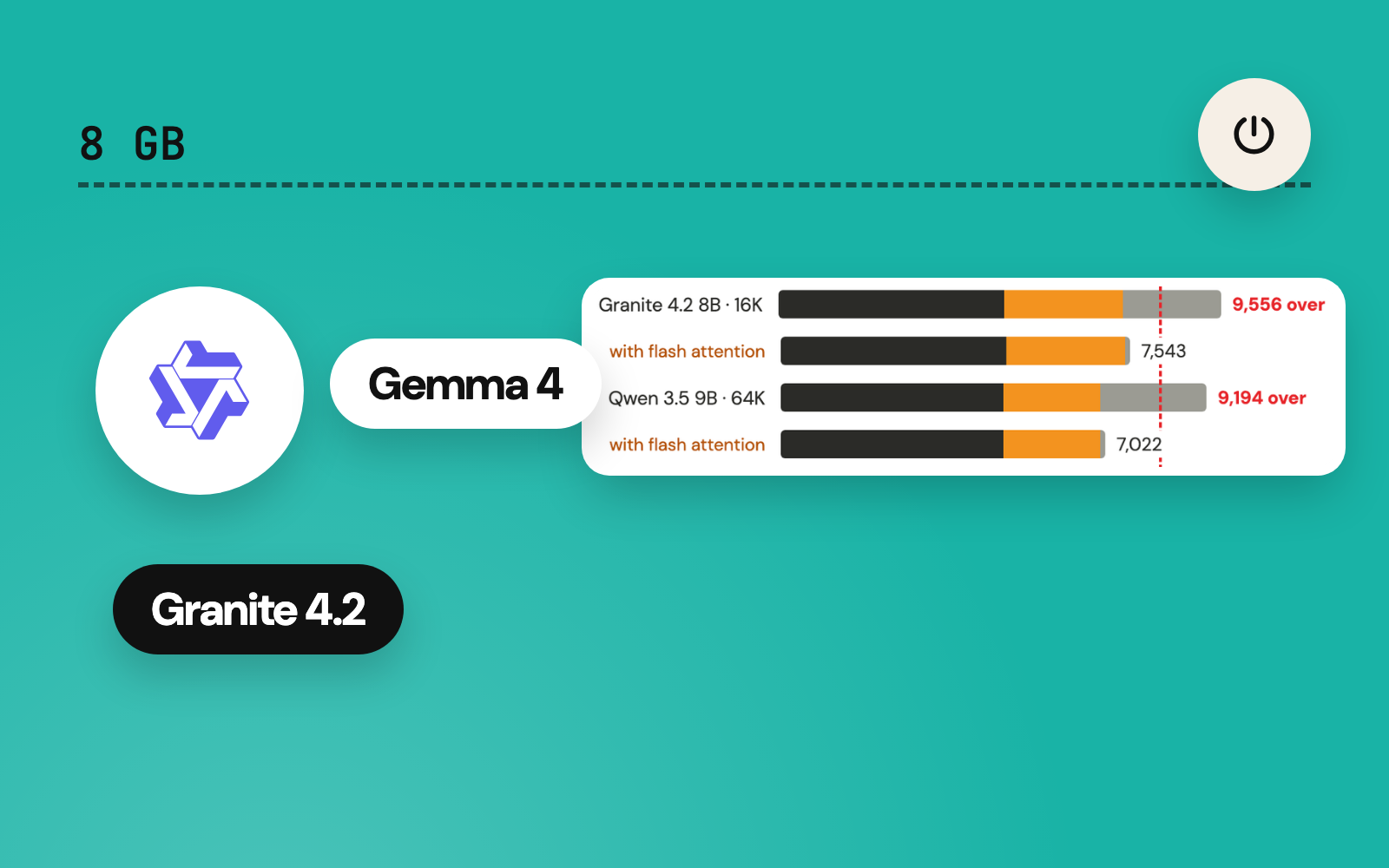
| Qwen 3.5 9B, 64K | 4,812 | 2,098 | 2,284 | 9,194 | Over by 1,019 |
| IBM Granite 4.2 8B, 16K | 4,876 | 2,560 | 2,120 | 9,556 | Over by 1,381 |
| IBM Granite 4.2 8B, 64K | 4,876 | 10,240 | n/a | 15,116 before compute | Over by 6,941 |
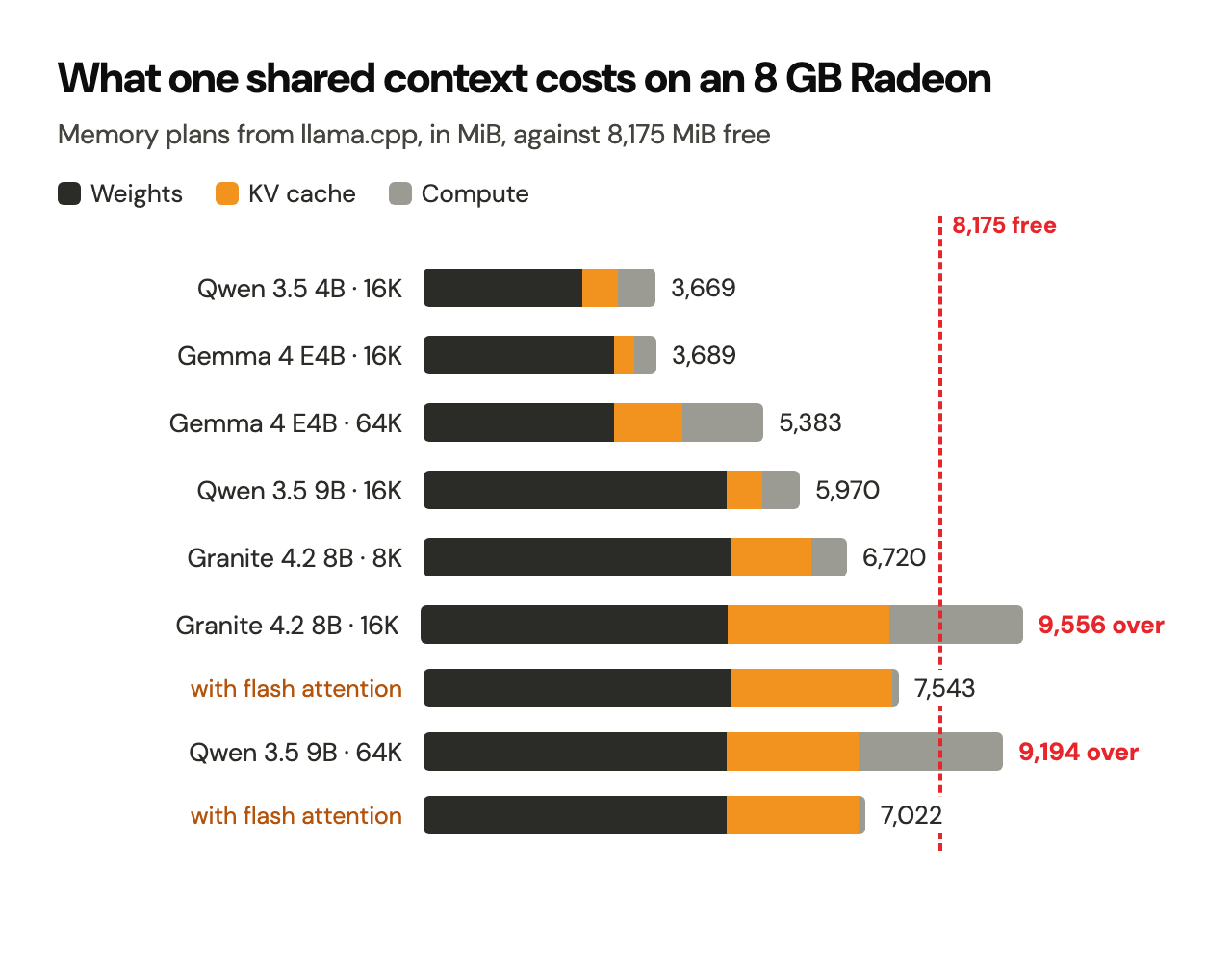
When a plan runs over, the server still starts. llama.cpp warns (cannot meet free memory target of 1024 MiB, need to reduce device memory by 2093 MiB), keeps every layer on the Radeon as the launcher demands, and generation crawls: 0.43 tokens/s for Granite at 16K, 0.36 tokens/s for Qwen 3.5 9B at 64K. The overflow most likely spills into system memory across the PCIe bus; the warning and the collapse fit that reading.
The shared context setting itself works exactly as designed: every run logged n_ctx equal to the value in context.txt, and the setting held for every model, struggling ones included. The table shows the price of that design on an 8 GB card, and the launcher changes below cut it.
The hidden variable: macOS caps the CPU within a minute
Halfway through the session, speeds that had matched Episode 5 started falling apart. Granite's llama-bench generation came back at 5.02 tokens/s with a wide spread, and Gemma's at 8.35, minutes after the same Gemma model had served 27 tokens/s through llama-server. The cause sat outside llama.cpp. pmset -g therm, which macOS documents as showing "thermal conditions that affect CPU speed", read:
CPU_Scheduler_Limit 	= 100
CPU_Available_CPUs 	= 16
CPU_Speed_Limit 	= 20
macOS was holding the processor at 20% of its speed. From then on, every measurement carries the speed limit it ran under, sampled every two seconds.
The cap arrives fast. The Mac idled back to CPU_Speed_Limit = 100; a llama-bench run of Qwen 3.5 9B started then, and 37 seconds later the limit read 20 again. Inside that single run, the three generation repeats read 20.8, 18.7 and 7.9 tokens/s, while prompt processing held at 156 tokens/s throughout.
| Same test, two CPU states | Speed limit 100 | Speed limit 20 |
|---|---|---|
| Qwen 3.5 4B at 16K, 48-token answer | 31.9 tokens/s | 10.2 tokens/s |
| Qwen 3.5 9B, llama-bench generation repeat | 20.8 tokens/s | 7.9 tokens/s |
Generation suffers and prompt processing holds because they stress different parts of the machine. Prompt processing hands the Radeon large batches. Generation produces one token at a time, and every token needs CPU work to schedule the GPU: llama.cpp prepares the compute graph and MoltenVK translates the Vulkan commands into Metal. At a fifth of its clock speed, that per-token CPU work becomes the bottleneck while the GPU waits.
Why the cap arrives
The IT support session read the Mac's sensors by hand with llama-bench running and the limit at 20:
| Sensor | Reading |
|---|---|
| Fans | 5,599 and 5,184 rpm, 99% of their 5,616 and 5,200 rpm maximum |
| CPU cores | 57 to 61 °C |
| Radeon die | 63 °C |
| Platform controller hub | 72 to 73 °C, the hottest chip |
| Case underside (three skin sensors) | 44.7 to 45.4 °C, in a 27 °C room |
| Power | Adapter negotiated its full 96 W (20 V, 4.8 A); input 62.5 W, GPU rail 30 W |
Every chip sat well inside its range, the fans were already at full speed, and the power supply had headroom. The readings point to the case itself: with the fans maxed, slowing the CPU is the remaining way for macOS to hold the underside near 45 °C. The limit tracks the total heat in the chassis, from every source.
And the model was one source among several. While the Radeon ran at 100% utilisation, the llama-bench process itself used 370% to 660% CPU, four to six cores busy while the GPU did the arithmetic. The same readings counted Brave's tab renderers at 171%, VS Code at 71% and a Next.js development server at 60%.
Getting the Radeon's best: three launcher changes, each measured
The heat cap lives in the chassis, beyond any launcher's reach. What a launcher controls is how much heat the model adds for zero work, how much memory a context asks for, and what reaches the answer. Three changes came out of the tests, and each was measured before it went in.
1. Let the CPU threads sleep: --poll 0
By default, llama.cpp's CPU threads poll for work: they spin while they wait for the GPU. With the whole model on the Radeon, that spinning is pure heat, and on a capped CPU the spinning threads compete with the single thread that feeds the GPU. The test: Qwen 3.5 9B at 16K writing a 500-token answer, three times, each run starting from a cool CPU.
| Launcher setting | Speed | Time | llama-server CPU use |
|---|---|---|---|
| Default (--poll 50, default threads) | 6.07 tokens/s | 83 s | 490% |
| --poll 0 | 14.07 tokens/s | 36 s | 43% |
| --poll 0 -t 2 | 5.83 tokens/s | 86 s | 36% |
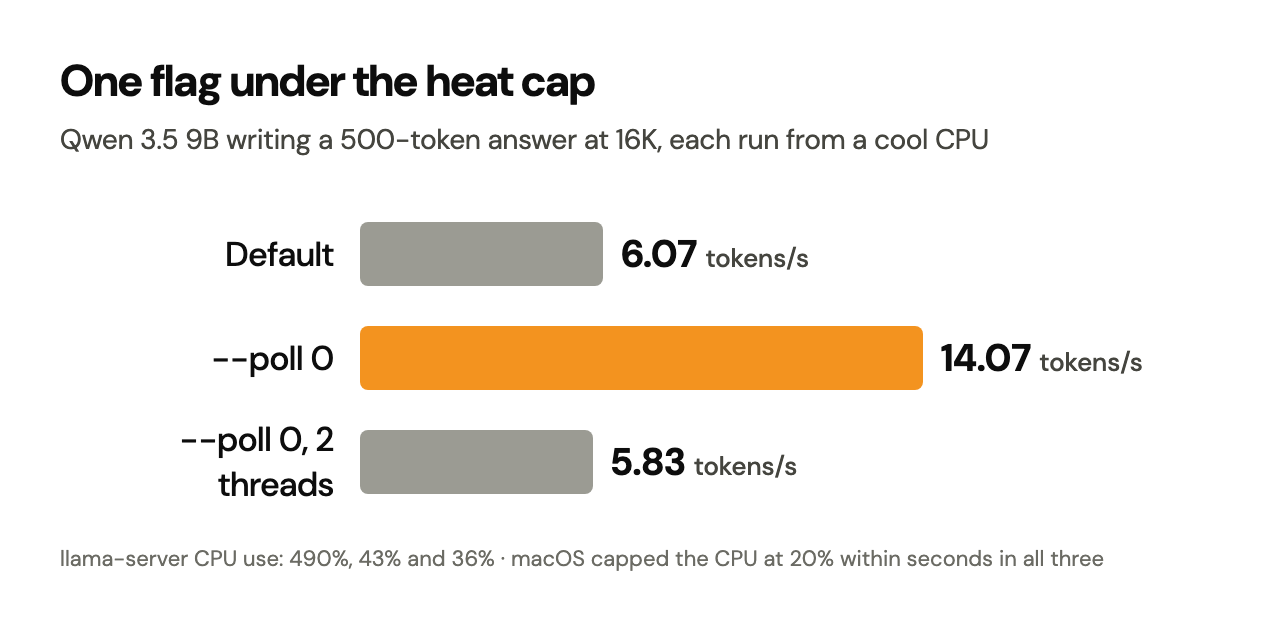
The cap arrived within seconds in all three runs; --poll 0 more than doubled the speed under it. Fewer threads on top undid the gain, so the change is the polling alone. On a cool CPU, the same change gave Qwen 9B 20.4 tokens/s at 16K, Episode 5's full speed, and Granite 20.2 tokens/s at 8K.
2. Flash attention where the context overflows, and there alone
--flash-attn off has been the setting since Episode 4's first working command. Turning it on shrinks the compute buffer from about 2,100 MiB to about 110 MiB, enough to bring the two overflowing cases inside the card:
| Model and context | Memory plan, flash attention off | On | Generation, off | On |
|---|---|---|---|---|
| IBM Granite 4.2 8B, 16K | 9,556 MiB | 7,543 MiB | 0.43 tokens/s | 3.47 tokens/s |
| Qwen 3.5 9B, 64K | 9,194 MiB | 7,022 MiB | 0.36 tokens/s | 4.74 tokens/s |
Those two "on" figures ran with the CPU capped and the old polling. Where a context already fits, the same switch costs speed (with --poll 0, each run from a cool CPU):
| Model and context | Flash attention off | On |
|---|---|---|
| Qwen 3.5 9B, 16K | 20.4 tokens/s | 18.1 tokens/s |
| IBM Granite 4.2 8B, 8K | 20.2 tokens/s | 4.2 tokens/s |
| Gemma 4 E4B, 16K | 25.8 tokens/s | 25.1 tokens/s |
So the launcher now turns flash attention on exactly where the measured memory plan overflows the Radeon: Granite at 16K and above, and Qwen 3.5 9B at 64K. Every other combination keeps it off. The shared context stays exactly as chosen; the switch changes how a context is processed, and its size stays the same. Granite at 32K and 64K still overflows even with flash attention and an 8-bit KV cache (32K fits at 7,703 MiB and ran at 0.58 tokens/s; 64K needs 10,423 MiB), so those two stay recorded as limits of this card.
3. One flag too many: the stray </think>
Granite's stray tag came from --reasoning-budget 0. llama.cpp documents that value as an "immediate end" of thinking, and it writes the closing tag itself, into an answer whose template had already turned thinking off. The same Granite request with the budget left at its default started cleanly, and reasoning_content stayed empty:
--reasoning-budget 0     '</think>function isPrime(n) {\n  if (n <= 1) return false;...'
budget at its default    'function isPrime(n) {\n  if (n <= 1) return false;\n  if (n ...'
The launcher keeps --reasoning off and Granite's {"enable_thinking":false}, and drops the budget flag.
The changed launcher, verified
With all three changes in, every model ran once more through the launcher's own settings at the saved 16K context, plus Qwen 3.5 9B at 64K, each run starting from a cool CPU. These runs came after Culpmit's new model-first mode went live: it idles other busy apps while a model works, and Episode 11 measures it on its own.
| Model and context | Flash attention | Before the changes | After |
|---|---|---|---|
| Qwen 3.5 4B, 16K | Off | 31.9 tokens/s | 32.9 tokens/s |
| Qwen 3.5 9B, 16K | Off | 9.3 tokens/s with the CPU capped | 20.4 tokens/s |
| IBM Granite 4.2 8B, 16K | On, by the new rule | 0.43 tokens/s | 10.5 tokens/s |
| Gemma 4 E4B, 16K, code | Off | 28.9 tokens/s, drafter off | 42.9 tokens/s, drafter on |
| Qwen 3.5 9B, 64K | On, by the new rule | 0.36 tokens/s | 18.3 tokens/s |
Granite at the default context is now 24 times faster and Qwen 3.5 9B at 64K 51 times faster. Every answer started cleanly, with zero </think> tags and an empty reasoning_content, and every isPrime passed its checks.
The agents
Each agent got the same small task in a fresh disposable folder holding one file, numbers.txt, with the line 17 25 58:
Read numbers.txt. Create sum.js that reads numbers.txt and prints the sum of the numbers in it. Run it with: node sum.js. Then reply with only the printed result.
The tests drove OpenCode 2.1.2 headless (opencode run --format json) with the launcher's server settings and generated configuration, at the saved 16K context, before the launcher changes and under the throttled CPU. Approvals stayed as the launcher sets them, ask for edits and shell commands, plus two allowances for the test: editing sum.js and running node. Any other command waited on an approval that a headless run leaves pending. Each run had four minutes.
| Agent | What happened | Result |
|---|---|---|
| gemma4-agent | Read numbers.txt, wrote sum.js, ran node sum.js, answered 100. The opening request carried 6,716 tokens of OpenCode instructions and tool definitions. | Pass (4 min 5 s, most of it reading the opening request) |
| qwen9-agent | Still processing its 7,000-token opening request, at 32 tokens/s on the throttled CPU, when time ran out. | Unfinished at four minutes |
| qwen4-agent | Rewrote the test folder's 150-character path as a short wrong one (/scratchpad/ep10/agent-dirs/qwen4/numbers.txt) and spent its four minutes retrying the read. The long path invited the mistake; a short project path is the fairer test. | Failed, partly a test-setup artefact |
| granite8-agent | The server started at 16K, and the model returned a correct tool call (read_file with {"path":"numbers.txt"}). At 0.43 tokens/s, a full OpenCode session was impractical. | Tool calling works; too slow before the fixes |
| ministral8-agent | ERROR: llama-server stopped during startup. The model file fails to load, as above. | Blocked |
Episode 8's Qwen 9B result stands beside this: on a cool CPU, the same agent wrote and ran hello.js. What separates the two runs is mostly speed. OpenCode's opening request alone runs to about 7,000 tokens, so prompt-processing speed decides how long an agent takes to begin, and the throttled CPU cut it to a fraction. With the launcher changes in, a rerun of the Qwen and Granite agents on a short project path is the obvious next test.
llm-off
llm-off was tested against both kinds of session it has to stop.
An agent server. With llama-server listening on port 8080:
Stopping all local AI runtime...

=== Local AI context ===
Local AI context: 16K (16384 tokens)

=== Local AI processes ===
No known local AI processes running.

=== Local AI server ports ===
Ports 8080 and 11434 are clear.
A chat session. With qwen4 running, the fixed llm-status listed 26696 llama-cli; llm-off stopped it, and the follow-up check found zero llama-cli processes.
As designed, llm-off also stops the Ollama app's server, which macOS had started at login. The Claude Code processes kept running throughout: llm-off matches six exact process names (opencode, llama-cli, llama-server, llama-bench, ollama and Ollama) and leaves everything else alone.
Result: pass.
Claude Code stays on its own account
In Episode 2, the Claude Code extension in VS Code was pointed at Ollama's local endpoint (http://localhost:11434) through ANTHROPIC_* variables in VS Code's settings. That routing was removed before this episode, and Claude Code went back to its own Anthropic account. The local launchers must leave it that way, so the same three checks ran three times: with the tests under way, after the agent and shutdown tests, and after every test:
| Check | During tests | After agent tests | After every test |
|---|---|---|---|
| ANTHROPIC_* variables in a fresh login shell | 0 | 0 | 0 |
| VS Code settings lines with ANTHROPIC_*, claudeCode.environmentVariables or claudeCode.disableLoginPrompt | 0 | 0 | 0 |
| Claude Code processes running | 4 | 5 | 5 |
VS Code's claudeCode.selectedModel setting reads "opus", and ~/.claude/settings.json holds zero environment overrides. The local launchers export OPENCODE_CONFIG_CONTENT for one OpenCode session and clear it afterwards; they write zero ANTHROPIC_* settings anywhere.
Result: pass.
Scorecard
| Check | Result | Evidence |
|---|---|---|
| Commands survive a full restart in a fresh shell | Pass | All ten launchers, four context commands and three controls resolve; context still 16K |
| Retired command names gone, new names present | Pass | whence finds zero matches for qwenoff, qwenstatus, llmoff and llmstatus |
| Radeon gate refuses a CPU fallback | Pass | Radeon hidden: refusal, exit status 1, zero model processes |
| Qwen 3.5 4B and 9B regression | Pass | llama-bench within 1% of Episode 5 |
| Granite permanent launcher and baseline | Pass after fixes | 0.43 tokens/s at 16K reproduced, then 10.5 after the fixes; stray tag traced and fixed; 20.2 tokens/s at 8K |
| Ministral 3 8B text | Blocked | wrong number of tensors; expected 531, got 309 |
| Gemma text, vision and speculative decoding | Pass | Chart read exactly; 92% draft acceptance on code |
| GPU offload, memory and throughput | Recorded | Memory plans for every model and context tested |
| Shared 16K, 32K and 64K setting | Pass, with limits recorded | Setting reaches every model; Granite 16K+ and Qwen 9B 64K overflow |
| Five agents | 1 pass, 1 working tool call, 3 unfinished or blocked | Under the throttled CPU, before the fixes |
| llm-off with live processes | Pass | Agent server and chat session stopped, ports clear |
| Claude Code isolation | Pass | Zero overrides before and after |
| llm-status display | Fixed | One flag; verified during a live chat |
| Launcher changes | Pass | See the verification table |
| Second restart | Still to run | Waits for a moment that suits the Mac's owner |
What the restart proved
The platform held. One line in .zshrc brings back five models, five agents, one context setting and three controls. The Radeon gate refuses correctly, llm-off stops everything it promises to stop, and Claude Code stays on its own account. The restart exposed one display bug, fixed in a single flag.
The models differ more than the platform does. Attention design decides how far one shared context stretches on 8 GB. Qwen 3.5 and Gemma 4 handle 64K inside the card; Granite 4.2 8B overflows at the default 16K and needed flash attention to fit; Ministral 3 needs a llama.cpp build of its files. Gemma 4 E4B came out as the strongest all-rounder on this machine: text, exact chart reading, a drafter that doubles code speed under the heat cap, the smallest memory bill, and the one agent that finished its task.
Heat sets the pace, and the launcher now works with it. The 2019 MacBook Pro caps its CPU within a minute of sustained GPU work, with its fans already at full speed, and generation is the casualty. Three measured changes answered it: threads that sleep while the GPU works, flash attention exactly where a context overflows the card, and one fewer reasoning flag. Granite at the default context went from 0.43 to 10.5 tokens/s, and Qwen 3.5 9B at 64K from 0.36 to 18.3.
The next steps follow from the scorecard: Ministral's llama.cpp files, an agent rerun on a short project path with the new launcher, a second restart, and Episode 11, which measures what happens when the rest of the Mac steps aside while a model runs.
Sources and evidence
Model documentation
- IBM Granite 4.2 8B model card: 40 layers, grouped-query attention with 32 query and 8 KV heads, head size 128, 128K native context, the
enable_thinkingswitch, Apache 2.0. - Ministral 3 8B Instruct 2512 model card: an 8.4B language model plus a 0.4B vision encoder, 256K context, Apache 2.0.
- Gemma 4 model card: E4B at 4.5B effective parameters (8B with embeddings), 42 layers, 512-token sliding window, 128K context.
- Gemma 4 multi-token prediction overview: how the drafter shares the target's embeddings and why its output matches standard decoding.
- Qwen 3.5 9B model card: 32 layers in a 3:1 pattern of Gated DeltaNet and gated attention, 4 KV heads of size 256 on the attention layers.
Runtime and tools
- llama.cpp speculative decoding:
--spec-type draft-mtp, the draft flags and the acceptance-rate statistics quoted above. - llama.cpp multimodal guide: a language model and a separate
--mmprojprojector file. - llama.cpp server README:
/health,--reasoning,--reasoning-budget,--chat-template-kwargsand--fit. - Ministral 3 8B Instruct GGUF on Hugging Face: one candidate source for llama.cpp-ready Ministral files, still to be tested here.
- macOS
man pmset: "-g thermshows thermal conditions that affect CPU speed."
First-party evidence from this session
- Shell output of every command shown, from fresh login shells after the restart.
llama-serverlogs at information level (-lv 4): device lists, offload counts, memory plans, KV cache sizes and draft acceptance lines.- The
timingsobject returned by each/v1/chat/completionsrequest: prompt and generation tokens per second, draft tokens generated and accepted. llama-benchJSON output with three repeats per test.- A two-second log of
CPU_Speed_Limit, Radeon utilisation and llama.cpp CPU use. - Sensor readings (fans, die and case temperatures, power) taken by hand by the IT support session, with llama-bench running.
- OpenCode's JSON event stream for each agent run, and the files each agent created in its disposable test folder.
- Published
- Author
- Booban Net.
- Category
- AI & Automation